![CV_logo_horizontal_outline COPY.png]](https://support.cannavigia.com/hs-fs/hubfs/CV_logo_horizontal_outline%20COPY.png?height=40&name=CV_logo_horizontal_outline%20COPY.png)
This release introduces optional Electronic Signatures for Article Batch Release, Block and Unblock actions, adds Subarea selection when taking cuttings into an existing Plant Batch, makes Goods In notes visible, and includes fixes across IoT, Tasks, Areas and entity pages.
Updates and New Features
Electronic Signature for Article Batch Release
Critical quality decisions on Article Batches can now be protected with an electronic signature, supporting GMP compliance. When the feature is turned on, releasing, blocking or unblocking an Article Batch is no longer a single click. The user must re-authenticate before the action is completed and recorded in the audit trail.
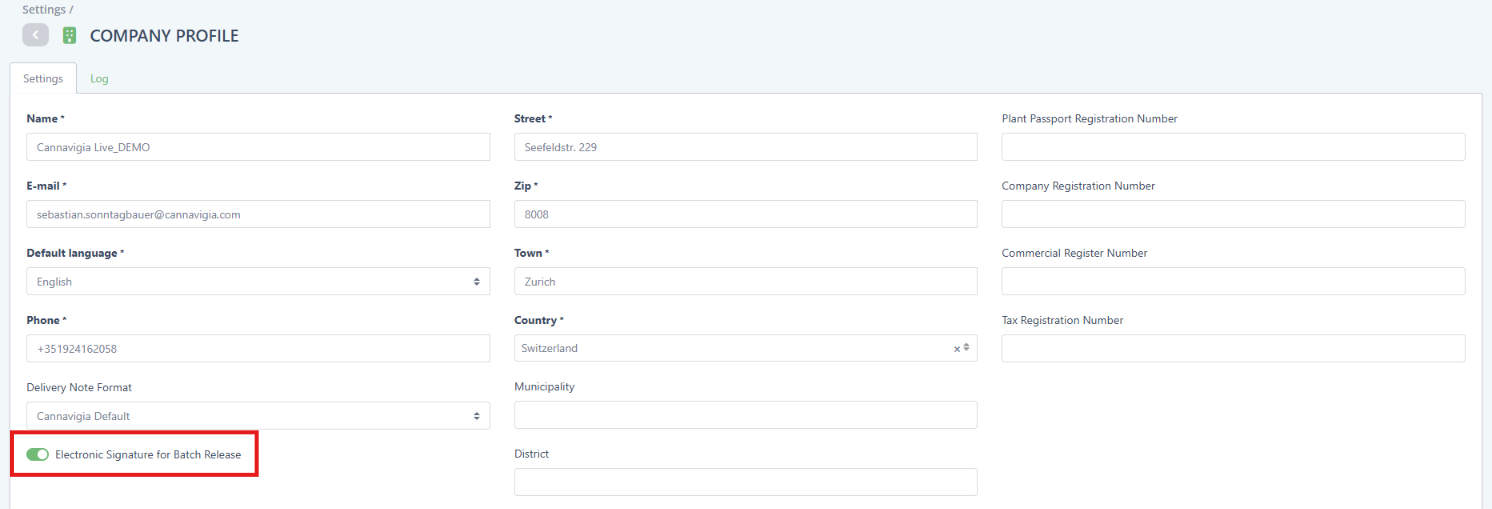
The feature is optional and off by default, so existing workflows are not disrupted. Company admins can turn it on or off at any time in Settings > Company Profile using the Electronic Signature for Batch Release setting. When it is off, Release, Block and Unblock work as before.
When the feature is on, the Release and Block actions follow a two-step workflow. In the first step, users review the batch information. In the second, they complete the signature. A progress indicator shows where they are in the process, and any information entered is preserved if they navigate back to the first step.
Users with Two-Factor Authentication enabled confirm the action with a code from their authenticator app. Users without 2FA re-enter their password. Before signing, users must explicitly confirm a signature statement acknowledging responsibility for the decision. If a second approver is required, they must sign in the same way.
General
- When taking cuttings from an untagged or tagged Plant Batch and selecting Add to existing Plant Batch, you can now choose a Subarea. The dropdown shows only the Subareas of the selected Plant Batch's Area and is hidden if the Plant Batch has none. If no Subarea is selected, the cuttings stay in the Plant Batch's default Area.
- Notes entered when creating a Goods In, or when adding a batch to a Goods In, are now saved and visible in the system. Editing the note on a Goods In or on an added batch updates the saved note as well.
Bug Fixes
- Fixed an issue where the temperature scale in the IoT graph switched to °F while navigating the graph with All data displayed.
- Fixed an issue where parameter units and Y-axis ranges were mixed up after zooming into the IoT graph.
- Fixed an issue where an area could not be archived even though it contained no entities.
- Fixed an issue where some entities displayed an incorrect date (for example 30.11.-0001) on the summary page while the transaction history showed the correct date.
- Fixed an issue where filter dropdowns on the entity Tasks tabs were cut off at the bottom of the table.