![CV_logo_horizontal_outline COPY.png]](https://support.cannavigia.com/hs-fs/hubfs/CV_logo_horizontal_outline%20COPY.png?height=40&name=CV_logo_horizontal_outline%20COPY.png)
This release introduces native Task Management, the Insight Assistant beta alongside a wide range of smaller enhancements and fixes across Cultivation, Inventory, Harvest and the Scale App.
Updates and New Features
Task Management
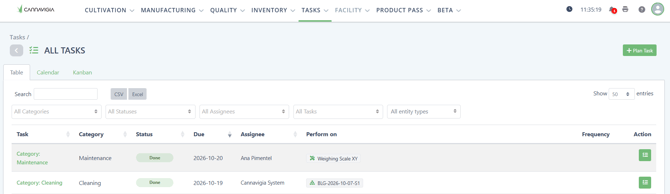
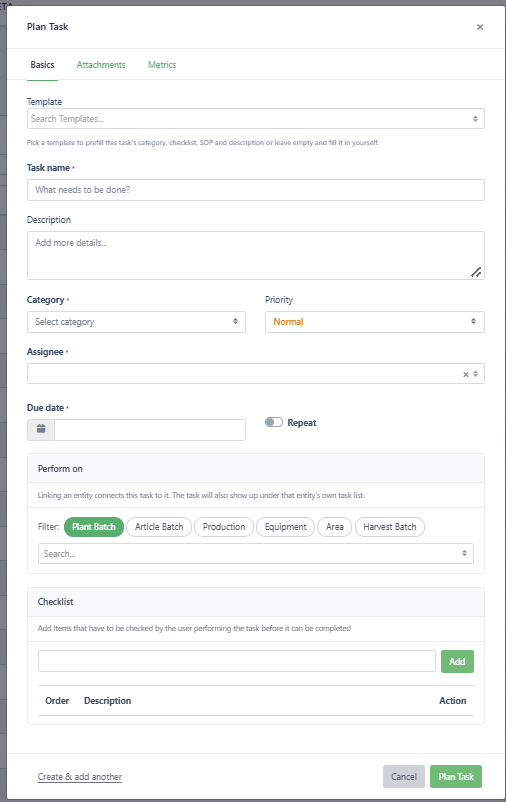
Cannavigia now has a native Task Management module, so teams can plan, assign and track operational work directly where it is recorded. Tasks can be created from scratch or prefilled with a template making it fast to plan repeating tasks.
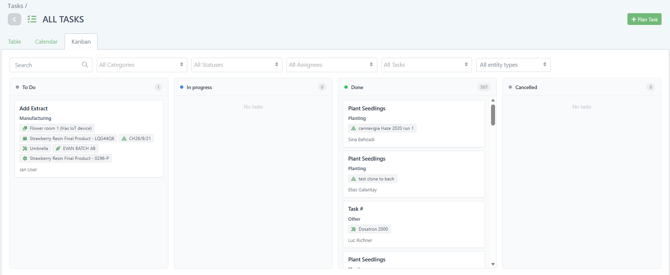
Each task can be linked to one or more entities through the Perform on field, or created without any entity for administrative work. Tasks can also include checklists that must be checked off before the task can be completed. Tasks move through To Do, In Progress and Completed, and can be cancelled with a mandatory reason. Completed tasks show who completed them and when, and any later change to a completion date keeps the original value, the new value, who changed it and when.
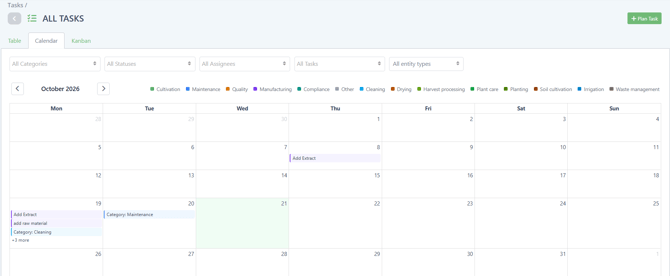
Users can add comments and attachments such as photos or certificates, and every entity now has a task table showing all linked tasks regardless of status. Tasks can be viewed as a Table, a Kanban board or a Calendar.
Use the series function to schedule repeating tasks such as scheduled cleaning, maintenance or calibration for equipment.
Insight Assistant (Beta)
The Insight Assistant lets users ask questions about the operational data. The beta is free to use for the duration of the beta. Try it out and give us your feedback.
Individual Packages and Scale App
Working with individual packages is faster and more reliable. Goods Out now has an Add All Available button that adds every available package of the selected batch in one click. The Scale App backend was updated for the individual package flow, and weights submitted from the Scale App now appear in the harvest batch packaging view automatically without a manual refresh. Approving or declining a waste weight record also keeps you on the Weight Log tab instead of returning to the overview.
IMC-GAP Delivery Note
Company admins can now choose a Delivery Note Format in the company settings. The new IMC-GAP layout includes the consignee and shipper licensing data, transport and driver fields, and a per-package packing list showing cultivation, harvest and article batch traceability.
General
- Each user can now set their own timezone in their profile (a prompt appears on login if none is set). Timestamps across Cultivation, Manufacturing and Inventory, as well as the Cultivation Report and PMBR, now follow it.
- The Harvest Batch Last Activity now shows clear messages such as Moved to an area, Split into a new batch or Processing started.
- The harvest batch container box has a new Quick Print action that prints the container label in one click, with a format drop-down.
- The harvest batch creation flow now has tooltips explaining the two weigh-in workflows (weigh whole plants before processing, or weigh processed plant parts before drying).
- The Disposal Report and the Dispose waste form now support volumetric units (mL and L) in addition to weight units, and the quantity field is labeled Total Amount.
- Applied additive amounts in the additives log are now displayed rounded to 3 decimals (stored values used for stock calculations are unchanged).
- The Cultivation Report shows a Generated timestamp in every page header and lists the number of destroyed plants in the Waste section.
- The user detail view now shows when a user was last active and includes an Activity tab listing the actions performed by that user.
Bug Fixes
- Fixed an issue where the Harvest Batch Last Activity field displayed no entries.
- Fixed an issue where the plant tab of tagged plant batches was empty.
- Fixed an issue where the system font did not support Thai characters and symbols in generated reports.
- Fixed an issue where sorting by last communication did not work properly in the IoT view.
- Fixed an issue where changing the amount in Goods In caused an error message.
- Fixed an issue where notifications did not display user names.
- Fixed an issue where data could not be saved in the additives section.
- Fixed an issue where the selected timezone was not applied to CSV and Excel exports on Additives.
- Fixed an issue where additives saved on mobile showed an incorrect time on desktop.
- Fixed an issue where the approver error message disappeared too quickly during second-approver batch approval of out-of-specification results.
- Fixed an issue where the full amount of a batch could not be disposed because of a stock discrepancy