![CV_logo_horizontal_outline COPY.png]](https://support.cannavigia.com/hs-fs/hubfs/CV_logo_horizontal_outline%20COPY.png?height=40&name=CV_logo_horizontal_outline%20COPY.png)
We’re pleased to introduce the latest Cannavigia Core updates, including the new Vigi Chat Assistant, workflow improvements across key operations, and a range of general enhancements and bug fixes.
Updates and New Features
Cannavigia Chat Assistant
Vigi is a new AI Chat assistant designed to help users quickly find information and get answers directly within Cannavigia.
The assistant can answer questions about Cannavigia modules, workflows, and platform functionality, helping users navigate the system more efficiently and find relevant information without leaving the application.
Users can access the assistant from anywhere in Cannavigia through the chat bubble available in the platform. The assistant supports questions in multiple languages and allows users to search and revisit previous conversations, making it easier to find information and continue ongoing discussions.
This initial release focuses on providing guidance and answering questions about Cannavigia. We will continue expanding the assistant's capabilities and knowledge in future updates.


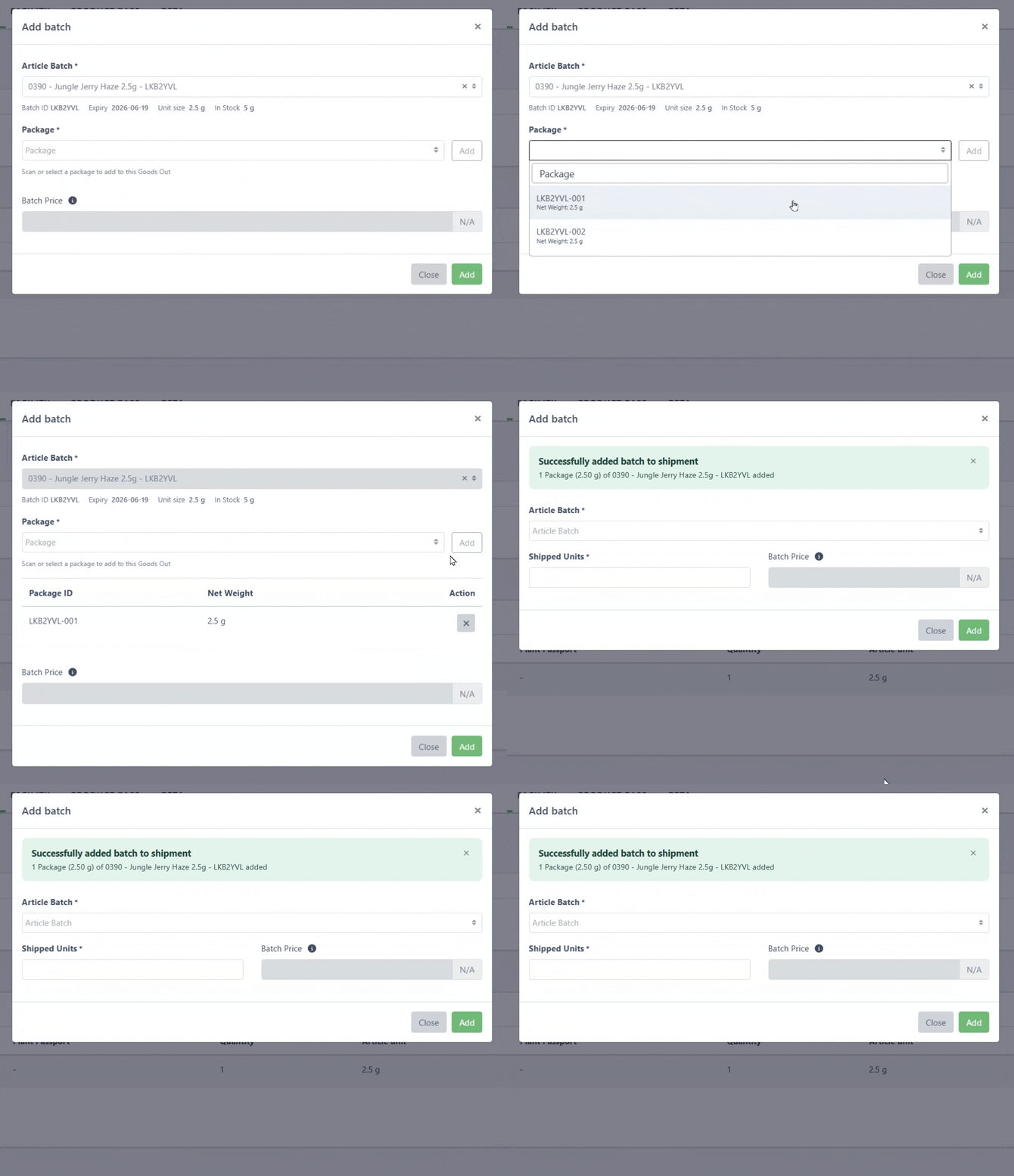
Article Batch Packages Goods Out
You can now seamlessly add your individual packages to a goods out. Either select the package from the drop-down or simply scan it with your QR Code scanner to add it to the goods out.
Simple Harvesting of large Tagged Plant Batches
Harvesting large numbers of tagged plants can be time-consuming and difficult to document accurately. This release introduces a simplified workflow for managing especially large harvest batches.
You can now disable weight-per-plant entry, allowing plant ID capture and weight capture to be handled separately. The updated plant selection also makes it easy to add all plants within a defined range to the harvest batch, creating a faster and more intuitive process.
-gif.gif?width=670&height=478&name=chrome-capture-2026-6-8%20(1)-gif.gif)
General
- Waste seal number can now be entered on any waste entry to link the seal number with the waste entry.
- The Add Batch window in goods out stays open so you can easily add multiple batches efficiently.
- When disposing waste, the disposed by drop-down now loads all entries when scrolling.
- In the goods out, when adding batches you can search by article number.
- The traceability view of the harvest batch summarizes waste and sample entries to improve readability.
- Composting was added to the disposal form.
- When packaging individual packages the unit stay locked until changed in the weigh in section.
- The inventory dashboard expires soon info section shows more information and has direct links to the batch.
- A new neutral 10 x 7 cm Article Batch Package Label is now available in the Print Center.
- Fixed an issue where the Cultivar Report was not loading correctly.
Bug Fixes
- Fixed an issue where creating additives from the Cultivation module caused an error when using the German language.
- Fixed an issue where some users were unable to access the Notifications page due to incorrect permissions.
- Fixed an issue where area images were not correctly centered and could overlap navigation tabs during editing.
- Fixed an issue where Goods Out unit quantities were incorrectly rounded in certain scenarios.
- Fixed an issue where searching by source was not working correctly in the Transaction Log.
- Fixed an issue where archiving an Area Cleaning record from search results could result in a 404 error.
- Fixed an issue where the search field was not working correctly when adding large amounts of materials in Manufacturing.
- Fixed an issue where editing a disposal would not load all previous inputs.
- Fixed an issue where the Cultivar Report was not loading correctly.